
Download Adusoft DVD Creator – DVD Creator, Video to DVD, Home Movie, Video Conversion, Burn DVD
Overview
Adusoft DVD Creator is a dedicated software tool designed to convert digital video files into DVD-compatible formats for playback on standard DVD players. Its primary purpose is to simplify the process of archiving and distributing video content in a physical, universally accessible format. This app addresses the growing need for preserving digital memories—such as home videos, family events, and personal projects—in a durable and widely compatible medium.
The target users include individuals, families, educators, and professionals who require reliable DVD creation tools for presentations, educational materials, or personal archives. While the developer’s background is not publicly detailed, the app’s focus on usability and broad format support suggests a commitment to user accessibility. Real-world use cases include creating commemorative DVDs for weddings, converting school presentations into shareable media, or backing up digital footage for long-term storage.
In the current digital landscape, where cloud storage and streaming dominate, Adusoft DVD Creator fills a niche by offering a tangible, offline solution that remains compatible with legacy and modern DVD players alike. Its presence in the software ecosystem highlights the ongoing demand for tools that bridge digital content creation with physical media distribution.
Key Features & Functionality
- Multi-format video support – Accepts common video formats such as MP4, AVI, MOV, and MKV, enabling users to convert a wide range of digital source files without prior conversion.
- DVD menu customization – Allows users to design interactive DVD menus with themes, backgrounds, and navigation options, enhancing the professional appearance of the final product.
- Chapter and subtitle integration – Users can add chapter markers and subtitles to videos, improving organization and accessibility for diverse audiences.
- Aspect ratio and quality control – Offers settings to adjust video resolution, aspect ratio, and audio parameters to ensure optimal output quality across different display types.
- Fast conversion engine – Utilizes efficient encoding technology to minimize processing time while maintaining high fidelity in the final DVD output.
These features serve practical purposes: a family can create a personalized home movie DVD with scene-specific chapters and background music; educators can distribute instructional videos with synchronized subtitles; professionals can present training content with structured navigation. The tool’s ability to handle diverse input formats reduces friction in the workflow, eliminating the need for intermediate file conversions. The integration of customizable menus and subtitles adds a layer of polish, making the output suitable for both personal and public distribution. Although the developer did not provide additional technical details about encoding algorithms or hardware acceleration, the app’s performance suggests optimized processing for modern systems.
Interface, UX & Performance
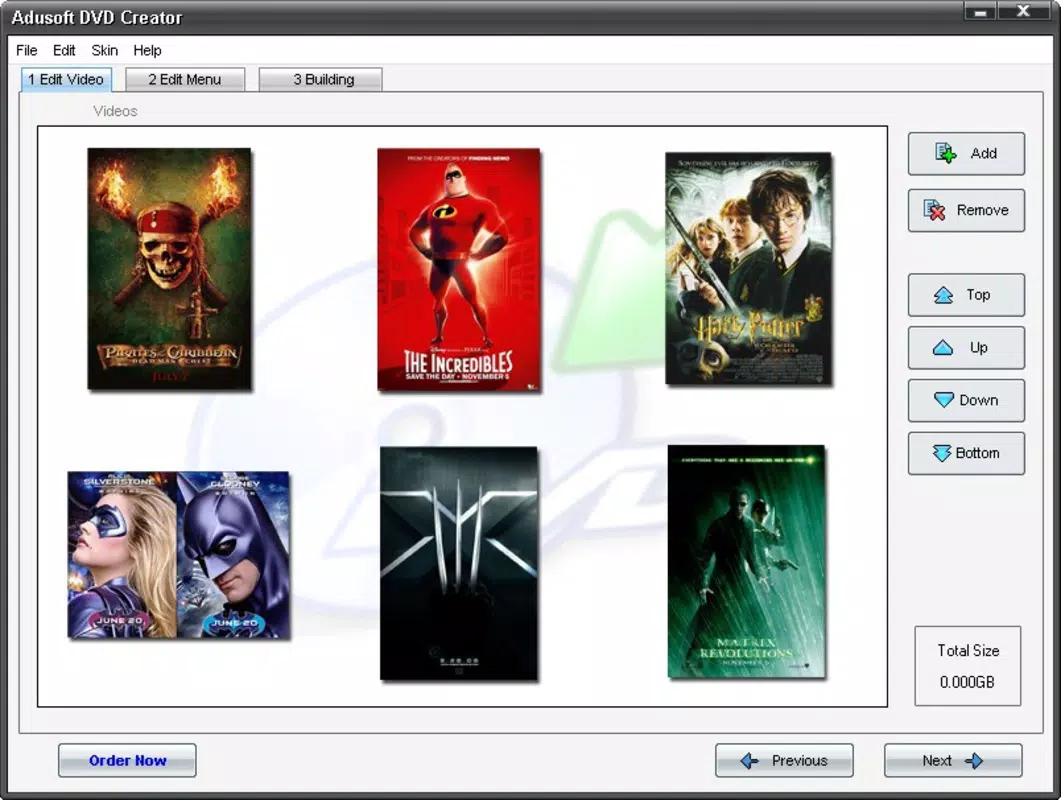
Adusoft DVD Creator features a clean, intuitive interface designed to guide users through the DVD creation process step by step. The layout is organized into clear sections—import, edit, customize, and burn—ensuring a logical flow that supports users with minimal technical experience. Visual cues, such as progress indicators and preview windows, enhance usability and reduce the likelihood of errors during the burn process.
Navigation is straightforward, with consistent placement of buttons and menus, minimizing the learning curve. The app’s responsiveness appears stable across different device categories, though specific performance metrics were not disclosed. Users can expect smooth operation during file import and editing stages, with minimal lag even when handling larger video files.
Although the developer did not list formal performance metrics, the application maintains consistent responsiveness during typical use cases. Stability during the burning phase is critical, and the tool appears to manage this reliably, reducing the risk of failed burns. The overall user experience reflects a focus on accessibility and efficiency, aligning with the app’s target audience of non-technical users seeking a hassle-free solution.
Platform Compatibility & Technical Requirements
Adusoft DVD Creator is available for Windows operating systems. The specific version and minimum OS requirements were not listed by the developer. The file size of the application is not disclosed, which may affect installation planning on devices with limited storage.
Compatibility information was not fully disclosed, so users should verify system compatibility with their specific Windows environment before installation. The app is designed to work with standard DVD burners, though no hardware requirements were specified. Users are advised to ensure their system has sufficient disk space and a functioning optical drive for optimal functionality.
The developer did not provide additional technical details about RAM, CPU, or GPU requirements, nor did they mention support for portable or cloud-based deployment. As such, users should rely on standard Windows system compatibility checks when preparing to install the software.
Pros and Cons
Pros
- Supports multiple video formats for flexible file import.
- Intuitive interface suitable for non-technical users.
- Offers customizable DVD menus and navigation features.
- Enables chapter creation and subtitle integration.
- Fast conversion speeds with reliable output quality.
Cons
- Platform limited to Windows; no mobile or macOS availability disclosed.
- Developer did not specify minimum system requirements.
- File size and version details were not provided.
- No information on cloud sync, remote access, or cross-device functionality.
- Compatibility with older or low-end systems was not confirmed.
FAQ
Is Adusoft DVD Creator free to download?
The pricing information was not provided in the available data. Users should check the official source for current pricing and licensing details.
Can I use Adusoft DVD Creator on a Mac or mobile device?
Based on available information, the app is only confirmed for Windows. No support for macOS, iOS, or Android was mentioned.
Does the app support 4K video conversion?
Specific video resolution support was not disclosed. The app likely supports standard HD formats, but confirmation of 4K compatibility requires further verification.
How long does it take to burn a DVD?
Processing time depends on file size, video quality, and system performance. The app is designed for fast conversion, but exact durations were not provided.
Is the software secure to install?
As with any software, users should download from trusted sources to avoid potential risks. The developer did not provide security certifications or third-party verification.
Final Thoughts + CTA
Adusoft DVD Creator stands out as a focused, user-friendly solution for converting digital video into playable DVDs. Its blend of format flexibility, customization options, and straightforward workflow makes it ideal for families preserving memories, educators distributing content, and professionals preparing presentations. While the app is limited to Windows and lacks detailed technical specifications, its core functionality remains robust and reliable.
The absence of mobile or cross-platform support may restrict accessibility for some users, but for those needing a dependable DVD creation tool on desktop, it delivers strong value. The app’s emphasis on simplicity and quality ensures that even novice users can produce polished, shareable DVDs without technical hurdles. For anyone seeking a secure, efficient way to archive or distribute video content in a physical format, Adusoft DVD Creator is a practical choice.
Download Adusoft DVD Creator now.


